
Teaching today is very different from a few years ago. More students learn online and use different devices. Teachers need faster ways to create lessons that explain things clearly. Videos have become the best way to share information in a simple and friendly way. This is mainly because classes, training, and workshops are often online now.
However, making good videos can be hard. Filming, editing, recording voices, and creating graphics take a lot of time. Time is something teachers and trainers don’t always have. That is where Vidnoz AI helps. It uses smart AI tools so educators can easily turn their ideas into interesting lessons without needing cameras, microphones, or editing software.
What Is Vidnoz AI: A Helpful Tool for Today’s Classrooms
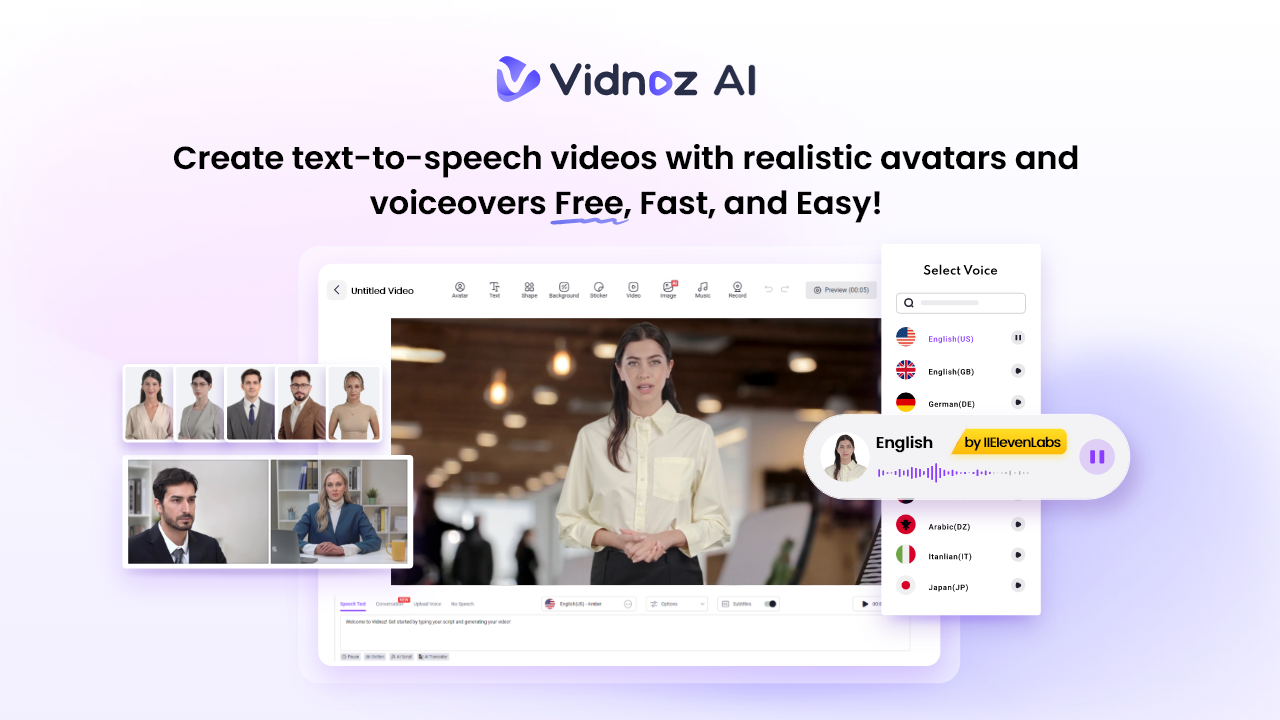
Vidnoz AI is an AI-powered video maker designed for teachers, coaches, and trainers. It quickly turns your scripts into videos with talking avatars, voiceovers, and animations.
One important thing to know is Vidnoz AI has ISO/IEC 27001:2022 certification. It ultimately means your lessons, student info, scripts, and files are kept very safe. This is great for schools and organizations sharing training materials.
Vidnoz AI makes creating clear and engaging lessons fast and easy.
Why AI Videos Are Great for Teaching and Training?
Teachers and trainers all over the world are using AI videos because they solve real problems. Here is why AI videos are becoming popular in classrooms and training:
Clearer Learning with Easy-to-Understand Visuals
Videos use pictures, movement, and talking to explain tricky ideas. When students see examples instead of reading long text, they understand faster. Visuals also help students remember important points by showing them something they can actually see.
· Saves Time for Teachers
Making one lesson takes a lot of work. Recording it again for every class takes even more time. AI videos let teachers reuse lessons or update them quickly. This frees up time for helping students instead of repeating recordings.
· Great for Language Learning
Teachers can easily translate lessons into different languages without recording again. This helps students who speak different languages and supports correct pronunciation with smooth and natural speech.
· Good for Learning at Your Own Pace
Students can pause, rewind, or watch lessons again whenever they want. This will be making learning easier and less stressful. This is helpful for those who like to take their time to understand new ideas.
· Perfect for Remote and Hybrid Classes
AI videos are easy to share online. Whether in virtual classrooms or company training sites, you can share these anywhere with just a few clicks. They make sure every student gets the same lesson no matter where they are.
Key Features of Vidnoz AI You Must Know
Vidnoz AI offers some powerful features which include:
Over 1800 Lip-Synced AI Voices
Choose from a big collection of voices that fit the mood of your lesson. Whether you want a friendly, calm, or formal voice, these sound natural and clear. This helps make your lessons easy to understand and more engaging for students.
More Than 2800 Templates in Many Languages
Vidnoz AI offers 2800+ ready to use video templates. You will find a template to fit your lesson no matter what you are teaching. There are templates available to make science, math, job training, safety, or onboarding videos on the go.
Templates save time and keep your videos neat and organized. This means you can create new lessons fast without starting from scratch every time.
Free 2 Minutes of Video Every Day
Vidnoz AI gives you two free minutes daily. This is perfect for quick updates, reminders or short lessons. You can also use this free time for testing new ideas without any cost.
Over 1700 Realistic Avatars
You can pick avatars for many roles like students, teachers, doctors, hosts, chefs, and more. The tool has a library of more than 1700 realistic AI avatars for you. There are three different types of AI avatars available in Vidnoz AI which includes:
- Avatar Lite helps you make simple avatars fast.
- Custom Avatar Pro lets you customize your avatar to match your lesson style.
- Motion Avatars show natural gestures and body moves to keep students interested.
Vidnoz AI can even create a digital twin. This helps you create an avatar that looks and sounds like you, speaking in over 40 languages. This is great for teaching students all over the world.
Vidnoz AI gives teachers the freedom to choose avatars that fit each lesson’s tone and purpose with all these options.
Easy 5-Step Guide to Making a Lesson Video with Vidnoz AI
Here is a simple step-by-step process to help teachers create AI-powered lesson videos using Vidnoz AI.
1. Sign Up or Log In
Go to Vidnoz AI and create a free account or log into your existing one. It only takes a minute. Once logged in, you will see your dashboard with avatars, templates, voices, and editing tools. You can also find your past videos here to keep working on them.
2. Choose a Template or Avatar
Pick from over 2800 templates or select an avatar that fits your lesson. There are avatars like teachers, students, or other professionals for teaching. Templates give you a ready-made design. These helps in saving time while avatars help make the lesson feel like a personal talk.
3. Add Your Script and Customize
Type or paste your lesson script into the text box. Vidnoz AI will turn it into a spoken voice using your chosen AI voice. You can also add images, key points, diagrams, or examples to make your lesson more interesting. If you use a digital twin, the avatar will speak in your own voice style.
4. Generate Your Video
When your lesson is ready, click the generate button. The AI will put everything together including voice, avatar movements, animations, and visuals in just a few minutes. Watch the preview to make sure it looks good and flows smoothly.
5. Download or Share Your Video
Download your finished lesson in high quality or share it right away on your learning platform, social media, or training system. You can always go back to make quick changes or updates later.
Final Thoughts
Vidnoz AI makes creating lesson videos easy by taking away the hard parts. It helps teachers to make clear lessons that students can understand. Vidnoz AI saves you time, helps you to explain ideas better, and lets you reach students in many languages. Overall, Vidnoz AI is a great helper for today’s educators.