
Embroidery is slow, patient magic. A single flower can take hours, with every petal built from hundreds of tiny stitches, and the final piece sits flat inside a hoop for all to admire. But the process is the beautiful part, and a photograph can’t show how those threads come together. From image to video, you can set your embroidery in motion. Upload an image onto Dreamina and use the Seedance 2.5 algorithm to animate it and see how threads twinkle, vines crawl, and flowers bloom. This tutorial talks about how to take pictures of your artwork, write the prompt, and make a video.
Why stitches were made for motion
Embroidery is built from small, directional marks. Satin stitches have a sheen that changes with the light, and French knots catch tiny shadows. Those factors give the artwork a unique appearance from all angles, something that can only be achieved through animation. A slow camera drift or a shifting light turns a still hoop into something that feels alive. And because embroidery already has a warm, handmade look, the video keeps its personality instead of looking cold or digital.
Photographing your embroidery
Aim for a photo that highlights thread texture:
- A flat, evenly pulled hoop:no puckers or loose fabric
- Side lighting:it brings out thread direction and sheen
- A plain backdrop:linen, wood, or a solid color
- A close crop:details fill the frame
- Sharp focus:especially on the main motif
What Seedance 2.5 does for threadwork
Fine texture and gentle light are demanding, and a few Seedance 2.5 upgrades help.
Threads that look physical
The reduced artificial look helps stitches keep their sheen and fiber, instead of melting into a smooth surface.
Steady shapes while light moves
Better consistency across frames keeps the pattern stable while highlights drift across the thread.
Fixes without a full redo
Region-level editing lets you remove a stray fiber or a distracting object without regenerating the whole clip.
New camera angles on a flat piece
Spatial perspective changes let you tilt the view across the hoop while the model fills in detail.
Thread the needle in three Dreamina steps
Step 1: Upload your reference image and write the prompt
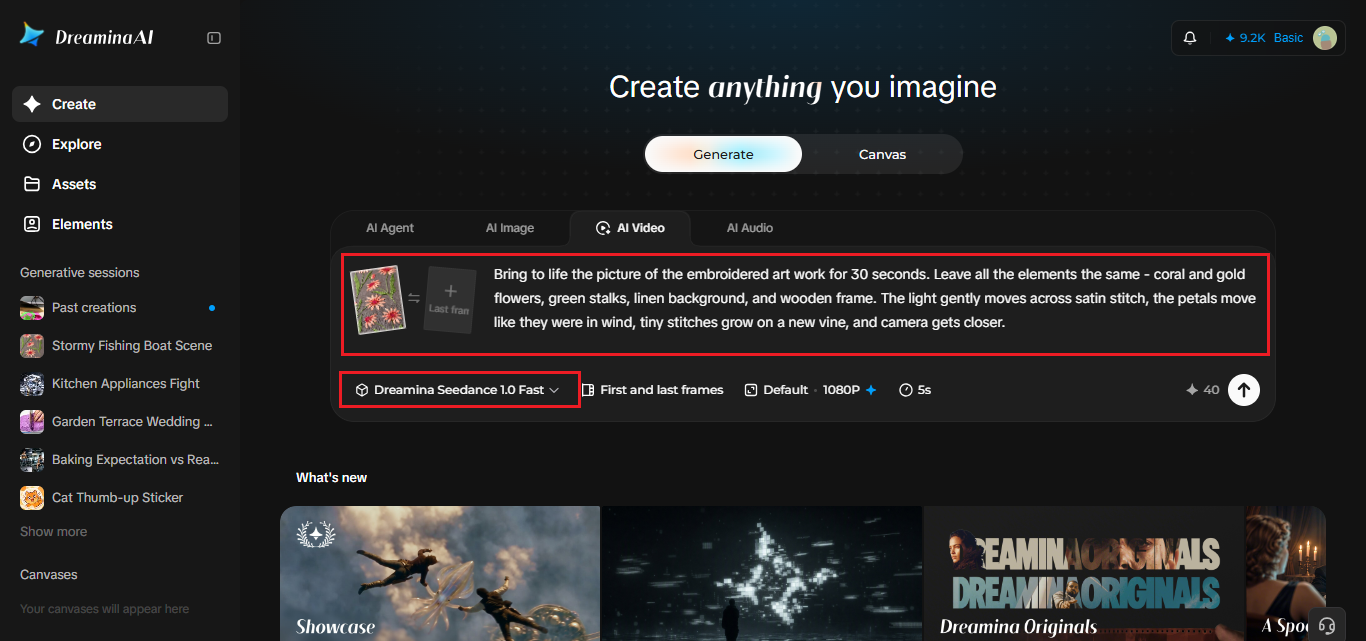
Open Dreamina, sign in, and go to the AI Video section. Click “Add reference image” and upload your embroidery photo. Then describe the motion and what to preserve.
This is a sample animation for 30 seconds: Bring to life the picture of the embroidered artwork for 30 seconds. Leave all the elements the same – coral and gold flowers, green stalks, linen background, and wooden frame. The light gently moves across satin stitch, the petals move like they were in wind, tiny stitches grow on a new vine, and camera gets closer.
Step 2: Generate your video
Choose the Seedance 2.5 model, set the clip length, and select 16:9 for YouTube or 9:16 for TikTok. Click Dreamina’s icon and wait for it to process. Square-looking hoops sit well in vertical frames, too.
Step 3: Enhance and export
Use Dreamina’s AI editing tools to finish. Upscale sharpens the stitches, and Generate soundtrack adds a soft, acoustic track. Export the clip and share it. If the threads look smooth, add words like “visible thread texture” and run it again.
Describing thread and motion
Use words that name the thread and the movement: satin stitch, French knot, stem stitch, shimmering silk, matte cotton. Describe motion as gentle and slow, like a breeze, a ripple of light, or a vine growing stitch by stitch. Avoid fast or dramatic movement, which can break the look of real fabric. Name what must stay the same, like the colors and the hoop.
A stitch-by-stitch reveal
One of the most satisfying ideas is a reveal that shows the design building itself. Ask for stitches that appear in order, a vine that grows along the stem, or petals that fill in with color one at a time. It creates an illusion that the process of making embroidery is being seen. The pace of embroidery should be slow and consistent and the design created should stay visible for a few seconds at the end of the video.
Sound for a quiet craft
Embroidery is calm, so keep the sound calm too. A soft acoustic track, the quiet pull of thread through fabric, a faint ticking clock: these details set the mood. Use Generate soundtrack for a base, and add subtle craft sounds in an editor if you like. Keep the volume low, so the thread remains the star.
Crediting and selling honestly
If you sell your work or share patterns, be clear about what’s real. Label animated clips as stylized, and share genuine photos of the actual stitching too. Many embroidery patterns are protected, so credit the designer, or use your own original designs, especially if you plan to post or sell. Honesty and credit build trust in handmade communities, and they keep your reputation strong. A short caption naming the pattern and the stitches is enough.
Let your threads move
Embroidery shows patience in every stitch, and a little motion can celebrate that effort. Dreamina and Seedance 2.5 can guide you through transforming a silent circle into a small work of fabric art. Choose your favorite creation, take a careful photo of it, and create a thoughtful prompt. Your embroidery should get its audience.