

In the modern digital workspace, cluttered desktops have become a silent productivity killer. Endless icons, disorganized folders, and random screenshots not only make your screen look messy but also slow down your workflow. iTop Easy Desktop is a powerful Windows desktop organizer software — designed to fix exactly that. It helps you declutter, customize, and optimize your workspace so you can stay focused and efficient.
Whether you’re managing multiple projects or simply tired of searching for files buried in a sea of icons, iTop Easy Desktop brings order, style, and intelligence to your desktop — effortlessly.
Effortless Organization with Boxes
At the heart of iTop Easy Desktop lies its signature feature — Boxes. This function allows users to categorize files, folders, and shortcuts into neatly organized visual containers. Whether you’re managing project documents, multimedia assets, or daily work files, Boxes make it easy to keep everything in its place. Instead of wasting time searching for files, you can access what you need instantly, improving both workflow and concentration.
Stay on Track with Schedule, iNotes, and Other Widgets

Organization isn’t only about where your files go — it’s also about managing your time. iTop Easy Desktop’s widgets make it easy to keep your workday structured and stress-free.
- Schedule(Syncs with Google Calendar and Outlook Calendar): Manage your meetings, project deadlines, and personal reminders all in one convenient place for easy tracking.
- iNotes: A convenient sticky-note-style tool to jot down quick thoughts, to-do lists, or project ideas without opening another app.
- Clock: Keep track of time with a stylish, customizable clock that blends seamlessly with your desktop theme.
- Weather: Get real-time local weather updates at a glance, so you can plan your day with confidence.
- iPomodoro: Boost productivity with the Pomodoro technique—work in focused bursts using built-in timers that remind you when to take breaks.
A Visual Boost with Stunning Live Wallpapers
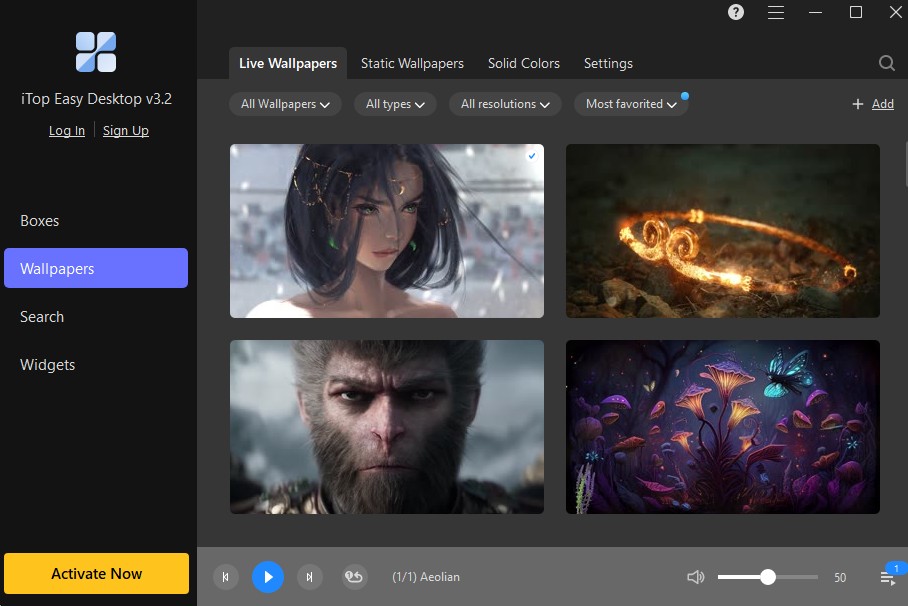
A clean workspace should also be inspiring. iTop Easy Desktop’s Live Wallpapers bring your desktop to life with dynamic backgrounds that make working more enjoyable. Whether you prefer calming nature scenes or minimalistic gradients, you can switch wallpapers easily to match your mood.
Customization is key — your desktop doesn’t just look better, it feels like your space.
Smarter Workflow with ChatAI and More Tools
Beyond organization, iTop Easy Desktop integrates smart utilities to simplify your digital routine.
- ChatAI, the built-in assistant, can help with quick notes, task reminders, or information lookups.
- More Tools introduces useful utilities like Quick Search, Private Box, Folder Portal, and Auto Layout Alignment — everything designed to minimize wasted clicks and maximize productivity.
With AI-enhanced features, iTop Easy Desktop makes multitasking faster and more efficient than ever before.
Protect Your Files with Private Box
Data privacy is a growing concern, and iTop Easy Desktop addresses it through Private Box — a secure vault for your confidential files. You can hide sensitive documents or personal folders from your main desktop and access them only when needed.
It’s simple to use: right-click on a file, select “Create a Private Box,” and your file is safely hidden. You can lock or unlock it anytime with a password, ensuring peace of mind.
Quick Search and Auto Align Layouts: Speed Meets Precision
No more wasting minutes trying to find files. The improved Quick Search lets you locate any file, app, or folder instantly by typing just a few characters.
Meanwhile, Auto Align Layouts keeps your desktop perfectly organized by automatically aligning Boxes into neat rows and columns. Even if you move things around, one click brings everything back to order — precise and satisfying.
Advanced Productivity Tools: Folder Portal, Auto Save Layouts & Smarter Roll
iTop Easy Desktop doesn’t stop at basic organization. It adds thoughtful touches that make everyday work smoother:
- Folder Portal: Create shortcuts that open directly into frequently used folders — like a mini File Explorer right on your desktop.
- Auto Save Layouts: Keeps a backup of your desktop layout, so if you restart or accidentally rearrange items, you can restore your setup instantly.
- Smarter Roll: Automatically minimizes Boxes to the edge of your screen when not in use, keeping your workspace tidy yet accessible.
These small enhancements add up to a faster, cleaner workflow — ideal for professionals who value efficiency.
How to Use iTop Easy Desktop Effectively
To make the most out of iTop Easy Desktop, follow these quick steps:
- Download and Install: Get the software from iTop Easy Desktop and complete the quick setup.
- Organize with Boxes: Create categorized Boxes for work, media, or personal files.
- Add Widgets: Set up Schedule, iNotes, and Calendar widgets to manage daily tasks.
- Secure Files: Use Private Box to store sensitive items.
- Customize Look: Apply Live Wallpapers to personalize your desktop.
Within a few minutes, you’ll have a desktop that’s not only functional but also motivating to work on.
Final Thoughts
iTop Easy Desktop redefines what desktop organization means in the modern workspace. It’s not just a file sorter — it’s a complete desktop management solution that combines structure, aesthetics, privacy, and smart tools in one clean package.
From Boxes that simplify file management to intelligent widgets, Live Wallpapers, and privacy protection, every feature is designed with one goal: to help you work smarter, not harder.
If your Windows desktop has turned into digital chaos, now’s the time to take control.
Download iTop Easy Desktop today and transform your workspace into a clear, efficient, and inspiring environment.